|
Constants |
|

FESTWERTE_ALLGEMEIN
The |Settings| menu is used to define various basic program settings. You can determine, for example, whether certain planning functions are to be used or how the workflow is managed.
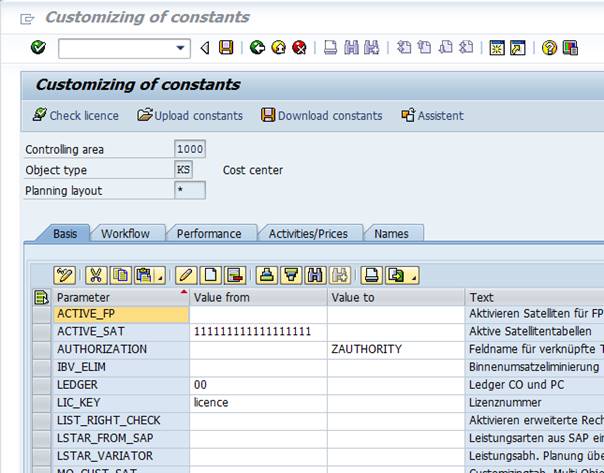
The |Settings| menu is only accessible to the Administrator authorization. The settings are applied depending on the controlling area and the object type (cost center, order or WBS element), and, if necessary, on the planning layout – as shown in the upper section of the menu.
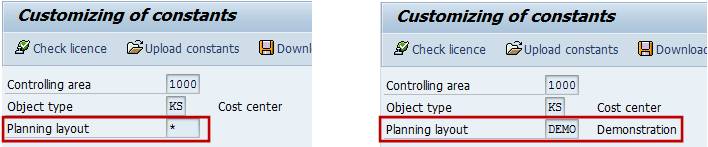
If no planning layout is defined in the menu, we are talking about general values or *-constants (in the following figure on the left; on the right you can find the constants for the layout DEMO).
The list of constants is subdivided into five tabs, which allocate the individual constants to the following subject groups:
|
Basis |
Basic settings, such as the definition of a license key and general activation of the satellites used. |
|
Workflow |
Settings which control the workflow during the planning process |
|
Performance |
Settings for increased performance when using Allevo Multi |
|
Activities/Prices |
Settings for the display of prices |
|
Names |
Defining names of buttons and satellites |
|
All |
Alphabetic list of all the constants active for the actual layout. The list also contains constants from the *-layout which are relevant during the program execution (highlighted in gray). |
The Basis tab shows four constants that are required to be always available as *-constants:
§ license number (LIC_KEY)
§ general activation of satellites (ACTIVE_SAT)
§ general activation of RFC destination (RFC_DEST)
§ activation of the advanced verification of authorizations (LIST_RIGHT_CHECK)
If no constants are defined for the relevant planning layout, reference is automatically made to the constants defined in the *-settings. If on the contrary the constants are defined for both levels, the constants for the relevant planning layout are prevailing (except for the above four constants).
When Allevo is installed for the first time, use the |Upload constants| button to upload the constants from a text file which is supplied with the system. This includes the basic settings for range definitions. The |Download constants| menu is used to save the constants as a textile, for example, for transfer to another SAP system.