|
Hide Selection Field for Projects (MultiObject) |
|
PROJ_HIDE_FIELD
* from Allevo version 3.0 (extended to 3.3)
With object type PR, Allevo shows the entry fields for project definition and WBS element when starting via the Single or MultiObject transaction (e.g. transaction /ALLEVO/PRMO). In special application cases (e.g. in connection with ProCED), entering a group may additionally be useful.
Using constant PROJ_HIDE_FIELD, you may individually determine, which of the three fields shall be displayed. Control is performed by a number in column Value from according to the following scheme:
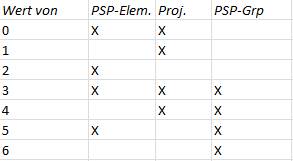
Example: entry 1 in Value from determines that only the project definition may be entered (Allevo will automatically use the corresponding representative WBS element).
X for Value from works in the same way as 2: only the field for the WBS element is ready to be entered. If the constant is not active, both the WBS element and the project definition are available for an entry (presetting).
Additional function: Suppress PopUp on the representative WBS element
Background: when starting Allevo via a project, Allevo automatically identifies a representative object (WBS element) for planning or also for reading satellites. A corresponding PopUp will point this out.
Entry NP (= No PopUp) in column Value to serves to suppress this PopUp (effective from Allevo version 3.3).
|
Note: |
The constant only applies for the PR Single and MultiObject Transaction. |