|
Settings of Allevo Multi for Projects |
|
PSP_MULTI
Planning a whole project, i.e. WBS elements of a project, strongly depends on the project structure. It is therefore conceivable that each individual WBS element might need to be planned.
Often, however, only those WBS elements are planned whose master record show the corresponding planning indicator, or that are available on a certain project stage. These WBS elements are then representative for subordinate levels of WBS elements receiving actual postings.
In other words, there are three factors of project structure often determining project planning:
1. Level of the WBS element
2. Representative planning of a hierarchical node (1/n)
3. Planning indicator of the master record
These three factors must be indicated in the start screen of the transaction /KERN/IPPPRM (MultiPage for projects):
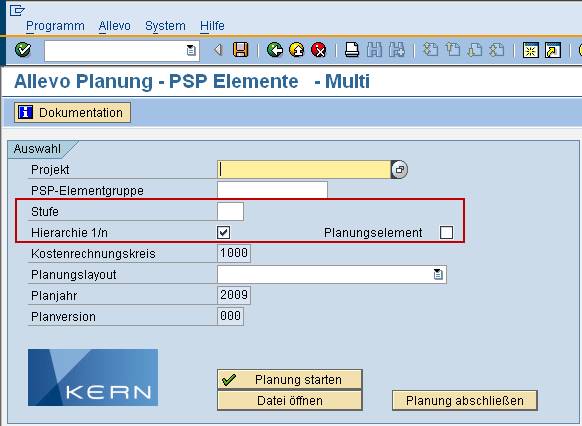
The level is used to define that only Excel sheets for WBS elements of this selected project level are created.
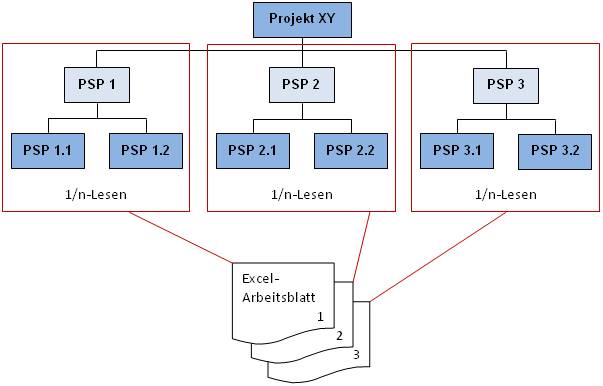
If the flag Hierarchy 1/n is set, all WBS elements subordinate to the respectively selected element are summed up during reading of data (see example).
If the flag Planning element is additionally set, only those WBS elements marked as planning elements in the master record are included.
The constant PSP_MULTI can now control the presets of these three factors in the selection screen.
|
Note: |
Presets via this constant are also considered when executing the Reporting (transaction /KERN/IPPPRREP). The specification on the level, however, is no longer relevant here, once the button “Group on one sheet” is set in the Reporting, since the level is only required to resolve objects in the MultiPage mode. From Allevo version 3.0, the settings also apply in offline planning (transactions /KERN/IPP_OFFL_GEN and /KERN/IPP_OFFL_IMP). |
Value from column contains a three-digit combination of numbers, with:
· the first digit indicating the factor hierarchy 1/n,
· the second the planning element and
· the third digit the level.
The first two digits may only contain the values 0 or 1. 0 means the field is left empty; 1 means a flag is set. The third digit, defining the level, may have values from 1 to 9.
The numbers 102 in column Value from therefore results in the following presets:
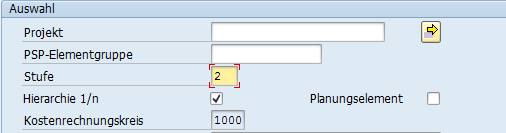
In column Value to of the constant, you may now define whether the planner may overwrite the presets. This is done following the same systematic of a three-digit number of the values 0 and 1. 0 stands for non-editable, 1 for editable.
In addition, W or E may be entered for the fourth digit (e.g. 102E):
§ for W, a warning appears if the level is empty and the 1/n Flag is set.
§ In the case of E, the 1/n flag is generally not considered when reading data (from Allevo version 2.7.14).
|
Note: |
Problems can arise if the field Level is empty in the start screen of /KERN/IPPPRM but the 1/n flag is set. In this case, accumulation is additionally done on the first element even if the project is completely cancelled. |
If this level is not constant but depending on the respective project structure, the constant PSP_MULTI_LEVEL may be useful.