Architecture and technology
Integration of the Allevo platform into your SAP system
Allevo ist eine Planungs- und Reportinglösung, die direkt in Ihr SAP-System integriert wird. Sie ermöglicht das Arbeiten in Excel oder über eine Weboberfläche, ohne zusätzliche Server, Datenbanken oder Middleware. Allevo nutzt standardisierte SAP-Schnittstellen (BAPIs) und beachtet die bestehenden Berechtigungen, sodass Ihre Daten vollständig innerhalb des SAP-Systems bleiben.

Database and frontend
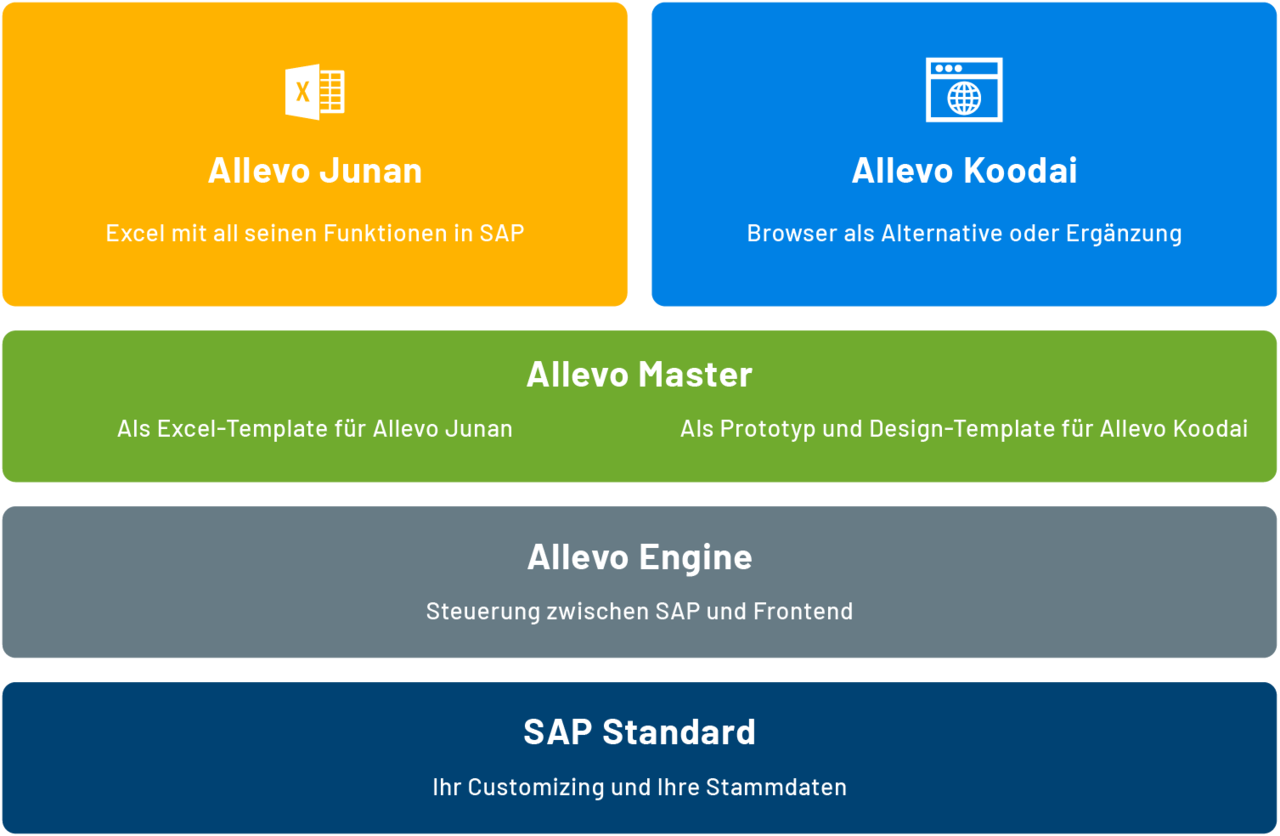
Systemarchitektur & Aufbau
Allevo consists of two components: An ABAP program as an SAP add-on and an Excel file, the so-called Allevo Master. This constellation makes Allevo very flexible, because the layout of the Allevo Master can be determined by the user and adapted to future changes. All program components are located in the protected namespace /KERN/. Planning transactions are carried out using the SAP BAPIs. Allevo respects all SAP authorizations and offers you its own roles in addition to the rights of the administrator, status manager and planner.
- Only the best of everything. You combine the functionality of Excel with the process and data security of SAP.
- Maximum benefit. Because of the direct and permanent interaction between SAP and Excel, you use your hardware and software exactly as it is today.
System requirements
Systemkompatibilität und Betrieb
Allevo unterstützt klassische SAP-ERP-Systeme ebenso wie S/4HANA. Je nach Frontend ergeben sich nur minimale Anforderungen an die Clients, ohne dass zusätzliche Server oder Hardware nötig sind. Dadurch bleibt die Lösung wartungsarm und unkompliziert in bestehende IT-Landschaften integrierbar.
- SAP: R/3 ECC 6.0 bis S/4HANA
- Excel (Junan): Microsoft Excel ab Version 2010, kein eigener Server nötig
- Web (Koodai): Webserver (z. B. IIS ab Version 7.0), Chrome/Edge, keine zusätzliche Hardware
Office Integration and SAP GUI Compatibility
Microsoft and SAP are constantly striving to improve and expand their applications. They are also actively working to improve the integration between the two environments with a particular focus on the SAP GUI. SAP GUI is a Windows application, and functions independently from the SAP release used. Each patch level contains numerous fixes, so performing regular updates will proactively prevent errors. Allevo therefore works best with the latest versions of the SAP GUI.
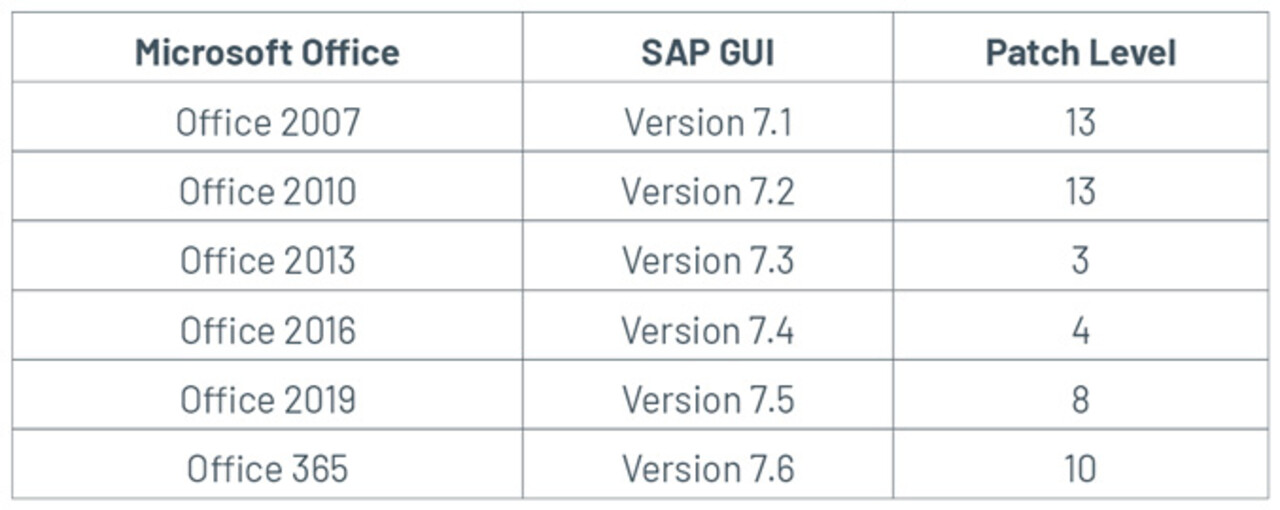
Compatibility SAP GUI and Office (64 Bit)
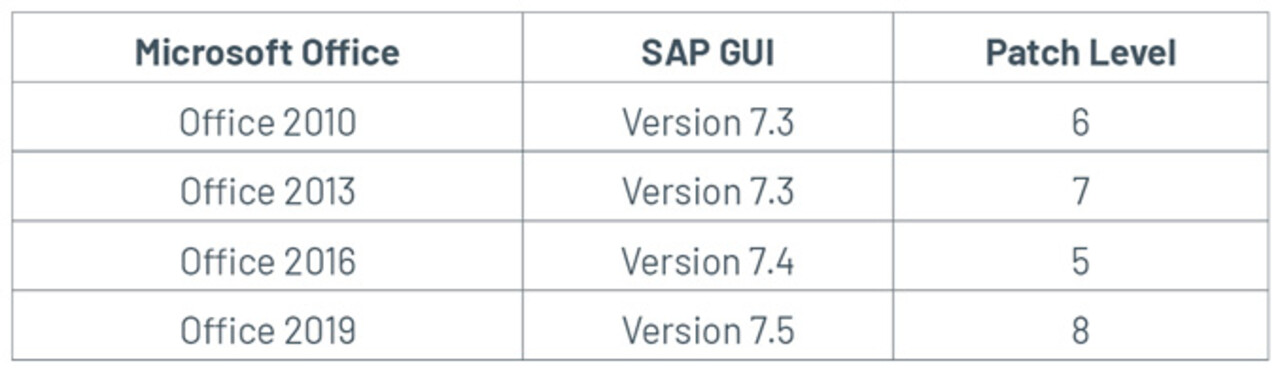
Macro Security and Kern Certification
All masters and other files for your planning with Allevo are provided in XLSM format. To protect against malicious software, many companies set the macro security settings high. In order for Allevo to work in this case, a certificate must be installed on all Allevo workstations, which identifies Kern AG as a trustworthy manufacturer. Together with the signed files, it ensures that the macros required for your process with Allevo are executed. We will be happy to provide you with this certificate with the corresponding signature for your files. We sign your files and send them back to you.
Makrosicherheit und Kern-Zertifikat
Alle Master und weitere Dateien für Ihre Planung mit Allevo werden im XLSM-Format zur Verfügung gestellt. Zum Schutz vor schadhafter Software setzen viele Firmen die Einstellungen bezüglich Makrosicherheit hoch. Damit Allevo in diesem Fall funktionieren kann, muss ein Zertifikat an allen Allevo-Arbeitsplätzen installiert werden, welches die Kern AG als vertrauenswürdigen Hersteller ausweist. Im Zusammenspiel mit den signierten Dateien sorgt es dafür, dass die für Ihren Prozess mit Allevo notwendigen Makros ausgeführt werden. Dieses Zertifikat mit der entsprechenden Signatur für Ihre Dateien stellen wir Ihnen gerne zur Verfügung. Wir signieren Ihre Dateien und senden sie Ihnen zurück.
Implementierung & Einführung
Die Einführung von Allevo erfolgt strukturiert und mit geringem IT-Aufwand.
- Workshop-Auftrag: Definition der Anforderungen
- Technische Einrichtung: Einspielen des SAP-Transports durch SAP-Basis & Kern-Support
- Systembereitstellung: nach ca. 2 Stunden einsatzbereit
- Technischer Test: Erstellung eines Layouts (Allevo Master) und Prüfung der Berechtigungen & Zugriffe
- Fachliche Ausarbeitung: Implementierung eines Use Cases mit Allevo-Berater
- Testphase: 6 Wochen Testzeitraum